
jquery实现div左右滑动
实现效果如图:上面两个按钮,一个“向左走”,一个向右走。通过按钮控制移动方向。
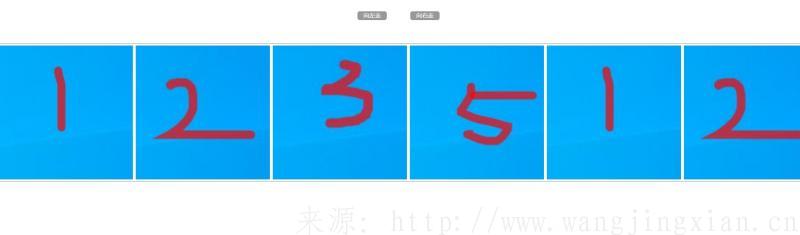
html代码:基础代码
<div class="nav">
		<a href="">向左走</a>
		<a href="">向右走</a>
</div>
<div class="box">
	<ul id="list">
		<li><img src="./01.jpg" alt=""></li>
		<li><img src="./02.jpg" alt=""></li>
		<li><img src="./03.jpg" alt=""></li>
		<li><img src="./04.jpg" alt=""></li>
	</ul>
</div>
css代码:控制外观样式
<style>
		*{
			margin: 0;
			padding: 0;
			text-decoration: none;
		}
		body{
			font-size: 14px;
		}
		.box{
			border: 2px solid #999;
			border-radius: 5px;
			margin: 100px auto;
			position: relative;
			overflow: hidden;
		}
		.box ul {
			display: flex;
			list-style: none;
			position: absolute;
			left: 0;
			top: 0;
		}
		.box ul li {
			margin: 5px;
			background-color: #999;
		}
		.box ul li img {
			object-fit: cover;
			width: 100%;
			height: 100%;
		}
		.nav{
			width: 300px;
			height: 20px;
			margin: 30px auto;
			display: flex;
			justify-content: space-between;
		}
		.nav a {
			font-size: 20px;
			color: #fff;
			display: block;
			width: 100px;
			height: 30px;
			background-color: #999;
			margin: 10px;
			text-align: center;
			border-radius: 8px;
		}
</style>
jquery代码:下面是核心代码,移动效果都靠jquery实现。
<script>
        //因效果宽度没有固定,是自适应的,所以先获取浏览器宽度作为基准
	var win = $(window).width();
	$("#list li").css("width", win/6);    //一排放6个div,所以宽度为浏览器宽度除以6
	$("#list li").css("height", win/6);    //因为是正方形div,所以高度与宽度一样
	$(".box").css("height", win/6+10);    //不重要,因为div有padding,为了底部border不被遮挡,所以加了10个像素
	$("#list").html($("#list").html()+$("#list").html()+$("#list").html());//因为要无缝轮播,最后一个div出来第一个div要跟上,所以复制了两次
	let num=2; //每次移动2个像素
	let t=null;
	//移动函数
	function go(){
		let myleft = $("#list").position().left;
		if(myleft< -$("#list").width()/3){
			myleft = 0;
		}
		if(myleft>0){
			myleft = -$("#list").width()/3;
		}
		$("#list").css("left",(myleft+num)+"px");
	}
	//执行移动函数,并设置速度为20毫秒
	t = setInterval(go,20);
	//点击第一个按钮,向右移动
	$(".nav a:first").click(function(e){
		e.preventDefault();
		num = -2;
	})
	//点击第二个按钮,向左移动
	$(".nav a:last").click(function(e){
		e.preventDefault();
		num = 2;
	})
	//当鼠标移到移动的div上,移动停止,离开再次启动
	$(".box").hover(function(){
		clearInterval(t);
	},function(){
		t= setInterval(go,20);
	})
</script>